> ## Documentation Index
> Fetch the complete documentation index at: https://docs.billions.network/llms.txt
> Use this file to discover all available pages before exploring further.
# Server
> Full reference for the x402 Human Proof Server SDK.
## Overview
`@billionsnetwork/x402-human-proof-server` adds human verification to any x402-enabled API — letting service providers verify that paying agents are backed by real humans, offer them better pricing, and make their servers spam and sybil resistant.
It enables API providers to:
* **Verify** that a paying agent is controlled by a unique, real human — not a bot or a sybil wallet — using Billions Network Proof-of-Uniqueness (PoU) attestations.
* **Offer discounted pricing** to agents backed by verified humans while keeping a standard price open to all payers.
* **Enforce per-identity usage caps** (`maxUse`) so a single human-backed agent cannot use a discounted price tier an unlimited number of times.
* **Gate additional capabilities** behind arbitrary attestation schemas beyond the basic ownership proof.
**Already running an x402 server?** Adding human-proof takes a single function call — jump straight to Step 2 in the Setup section.
**New to x402?** It's an [open payment protocol](https://docs.x402.org/introduction) that lets any API accept per-request payments from AI agents and humans — no subscriptions or API keys needed. The Setup guide below covers both.
## How It Works
The full request lifecycle with human-proof enabled:
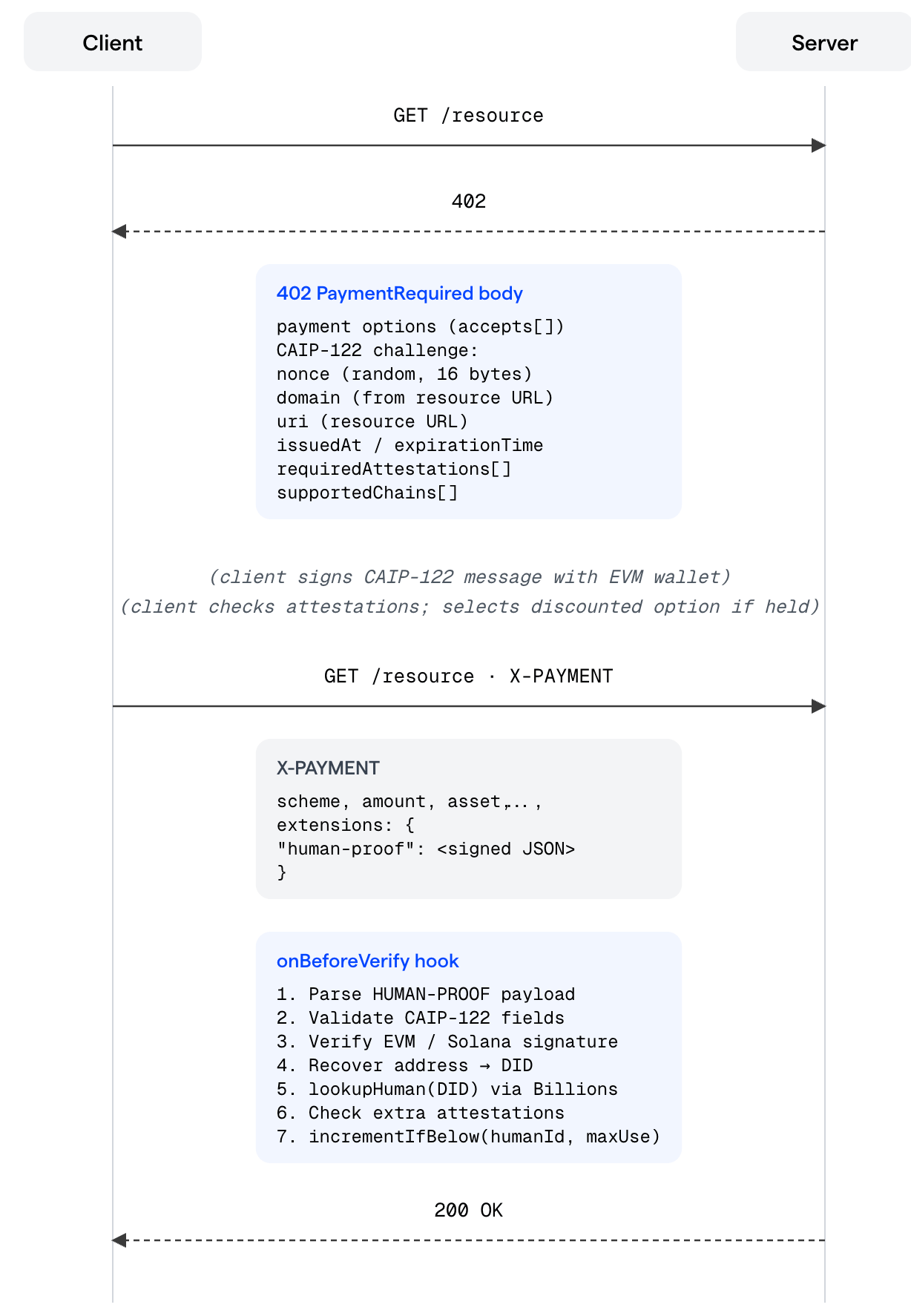 **Key insight:** Human-proof verification is layered on top of — not in place of — normal x402 payment verification. The facilitator still verifies the on-chain payment. The human-proof hook runs before that, as an additional gate on the selected payment option.
If the selected `accepts` entry has no `requiredAttestations` in its `extra` field, the human-proof hook is a no-op and the payment proceeds normally.
## Installation
If your server doesn't use x402 yet, install the x402 packages first:
```bash theme={null}
npm install @x402/express @x402/evm @x402/core
```
Then install the human-proof package:
```bash theme={null}
npm install @billionsnetwork/x402-human-proof-server
```
Requires Node.js `>= 20.11.0`
## Setup
Human-proof sits on top of x402 — it adds identity verification to an API that already accepts x402 payments. If you're new to x402, work through Step 1 first. If your server already accepts x402 payments, jump straight to Step 2.
### Step 1 — Make your server x402-compatible
[**x402**](https://docs.x402.org/introduction) is an open payment protocol built on the `402 Payment Required` HTTP status code. When a client hits a protected route without payment, the server returns a `402` with the accepted payment terms. The client pays and retries; the server settles on-chain and returns `200`.
Setting up x402 takes three things: a [**facilitator**](https://docs.x402.org/core-concepts/facilitator) (handles on-chain settlement), a **resource server** (coordinates x402 logic), and a **payment middleware** (gates your routes).
```typescript theme={null}
import express from "express";
import { x402ResourceServer, paymentMiddleware } from "@x402/express";
import { ExactEvmScheme } from "@x402/evm/exact/server";
import { HTTPFacilitatorClient } from "@x402/core/server";
const app = express();
// 1. Connect to a facilitator that settles payments on-chain
const facilitator = new HTTPFacilitatorClient({ url: process.env.FACILITATOR_URL! });
// 2. Create the x402 resource server and register the EVM payment scheme
const server = new x402ResourceServer(facilitator)
.register("eip155:84532", new ExactEvmScheme());
// 3. Gate your routes with payment requirements
app.use(
paymentMiddleware(
{
"GET /weather": {
accepts: [{
scheme: "exact",
price: "$0.01",
network: "eip155:84532",
payTo: process.env.EVM_ADDRESS!,
}],
description: "Weather data",
mimeType: "application/json",
},
},
server,
),
);
app.get("/weather", (_req, res) => {
res.json({ weather: "sunny", temperature: 70 });
});
app.listen(4021);
```
For the full x402 documentation, see [docs.x402.org](https://docs.x402.org/introduction).
### Step 2 — Add human-proof verification
With x402 in place, adding human-proof is a single function call plus two additions to your route config:
* **`configureHumanProofServer`** — registers the challenge generator and verification hook on the x402 server object.
* **A discounted `accepts` entry** — the second pricing tier, gated behind a PoU attestation.
* **`declareHumanProofExtension`** — tells the challenge generator what to embed in each `402` response for this route.
```typescript theme={null}
import {
configureHumanProofServer,
declareHumanProofExtension,
DEFAULT_AGENT_OWNERSHIP_SCHEMA,
type HumanProofEvent,
paywallInstructions,
} from "@billionsnetwork/x402-human-proof-server";
// 1. Register human-proof on the x402 server (call this once, before any routes)
configureHumanProofServer(server, {
onEvent: (event: HumanProofEvent) => {
if (event.type === "human_verified")
console.log(`Human ${event.humanId} verified`);
if (event.type === "human_not_registered")
console.warn(`Unregistered DID: ${event.did}`);
},
});
// 2. Update your route config: add the discounted tier and the human-proof declaration
app.use(
paymentMiddleware(
{
"GET /weather": {
accepts: [
// Standard tier - any payer
{
scheme: "exact",
price: "$0.01",
network: "eip155:84532",
payTo: process.env.EVM_ADDRESS!,
},
// Discounted tier - verified humans only
{
scheme: "exact",
price: "$0.006",
network: "eip155:84532",
payTo: process.env.EVM_ADDRESS!,
extra: {
requiredAttestations: [DEFAULT_AGENT_OWNERSHIP_SCHEMA],
},
},
],
description: "Weather data",
mimeType: "application/json",
// 3. Attach the human-proof challenge declaration to this route
extensions: {
"human-proof": declareHumanProofExtension({
statement: "By signing, you provide a human proof",
expirationSeconds: 900,
}),
},
},
},
server,
{}, // paymentMiddleware options - none needed
paywallInstructions(), // HTML shown to unpaid browser callers
),
);
```
That's it. Unverified callers pay `$0.01`; verified human-backed agents pay `$0.006`.
`paywallInstructions()` provides the default HTML page shown to browser users hitting a paid URL — it points them to the skill installation.
To add per-human usage caps or a custom paywall page, see Usage Limits (maxUse) and Paywall HTML further down.
### Complete Example
Here is the full server in one file, combining both steps:
```typescript theme={null}
import { config } from "dotenv";
import express from "express";
import { x402ResourceServer, paymentMiddleware } from "@x402/express";
import { ExactEvmScheme } from "@x402/evm/exact/server";
import { HTTPFacilitatorClient } from "@x402/core/server";
import {
configureHumanProofServer,
declareHumanProofExtension,
DEFAULT_AGENT_OWNERSHIP_SCHEMA,
type HumanProofEvent,
paywallInstructions,
} from "@billionsnetwork/x402-human-proof-server";
config();
const app = express();
const facilitator = new HTTPFacilitatorClient({ url: process.env.FACILITATOR_URL! });
const server = new x402ResourceServer(facilitator)
.register("eip155:84532", new ExactEvmScheme());
configureHumanProofServer(server, {
onEvent: (event: HumanProofEvent) => {
if (event.type === "human_verified")
console.log(`Human ${event.humanId} verified`);
if (event.type === "human_not_registered")
console.warn(`Unregistered DID: ${event.did}`);
},
});
app.use(
paymentMiddleware(
{
"GET /weather": {
accepts: [
{
scheme: "exact",
price: "$0.01",
network: "eip155:84532",
payTo: process.env.EVM_ADDRESS!,
},
{
scheme: "exact",
price: "$0.006",
network: "eip155:84532",
payTo: process.env.EVM_ADDRESS!,
extra: {
requiredAttestations: [DEFAULT_AGENT_OWNERSHIP_SCHEMA],
},
},
],
description: "Weather data",
mimeType: "application/json",
extensions: {
"human-proof": declareHumanProofExtension({
statement: "By signing, you provide a human proof",
expirationSeconds: 900,
}),
},
},
},
server,
{},
paywallInstructions(),
),
);
app.get("/weather", (_req, res) => {
res.json({ weather: "sunny", temperature: 70 });
});
app.listen(4021, () => console.log("Server running on :4021"));
```
## Testing Your Integration
The easiest way to test the integration end-to-end is through the [Verified Agent Identity skill](/agents/identity-overview).
Install it onto your agent and the agent becomes capable of the human-proof flow. Chat with the agent to complete the verification and pairing, then ask it to access your local server (`http://localhost:4021/weather`) — a successful response confirms the agent is recognized as backed by a verified human and the flow works as intended.
## Core Concepts
### x402 Payment Protocol
[x402](https://docs.x402.org/introduction) is an open HTTP payment protocol built on the `402 Payment Required` status code. `@billionsnetwork/x402-human-proof-server` extends the standard x402 flow by embedding a CAIP-122 challenge in the `402` response and verifying a signed proof of identity in the `X-PAYMENT` extensions before settlement.
### Proof of Uniqueness (PoU)
Billions Network issues Proof-of-Uniqueness attestations that cryptographically bind an agent to a verified human. The attestation is an on-chain record with a schema ID and a **nullifier** — a privacy-preserving identifier that uniquely represents the human without revealing their identity.
A PoU attestation binds an agent to a verified human. A single human can authorize multiple agents — all of them resolve to the same `humanId`, so quota (`maxUse`) and verification apply per human, not per agent.
The server SDK uses the attestation schema to verify that a wallet is backed by a registered human, and uses the nullifier as `humanId` for per-human usage counting.
### CAIP-122 Signed Messages
CAIP-122 defines chain-agnostic message signing ("Sign-In With X"). The SDK supports EVM / `eip191` (Sign-In with Ethereum). The signed payload includes:
`domain`, `uri`, `version`, `nonce`, `issuedAt`, `expirationTime` (optional), `resources`, `chainId`, `type`, `address`, `signature`, and `requiredAttestations`.
### Decentralized Identifiers (DID)
A DID is derived from the agent's EVM address using the Billions method:
```
did:iden3:billions:main:
```
This DID is used to query the Billions Network attestations API and look up the human registry. DIDs are computed deterministically — the SDK handles this conversion internally.
## Configuration Reference
### Environment Variables
| Variable | Required | Default | Description |
| ------------------ | -------- | ------- | --------------------------------------------------------------------------------------------------------------- |
| `EVM_ADDRESS` | Yes | — | Your wallet address that receives payments |
| `FACILITATOR_URL` | Yes | — | x402 facilitator endpoint — see [facilitator docs](https://docs.x402.org/core-concepts/facilitator) for options |
| `MOCK_FACILITATOR` | No | `false` | Set to `true` to skip real on-chain verification (local dev only) |
| `PORT` | No | `4021` | HTTP port to listen on |
### `configureHumanProofServer(server, options?)`
The recommended one-call setup. Registers the extension, wires all lifecycle hooks, and optionally adds rollback hooks when storage is provided.
```javascript theme={null}
import { configureHumanProofServer } from "@billionsnetwork/x402-human-proof-server";
configureHumanProofServer(server, options);
```
Internally calls:
* `server.registerExtension(createHumanProofExtension(extensionOptions))` — adds the CAIP-122 challenge generator to `402` responses.
* `server.onBeforeVerify(createVerifyHumanProofHook({...}))` — verifies the signed proof before payment settlement.
If `storage` is provided:
* `onAfterVerify` — rolls back usage on facilitator failure.
* `onVerifyFailure` — rolls back on hook error.
* `onSettleFailure` — rolls back if on-chain settlement fails.
**Options:**
| Option | Type | Default | Description |
| ------------------ | ---------------------------------- | ------------ | ------------------------------------------------------ |
| `extensionOptions` | `CreateHumanProofExtensionOptions` | `{}` | Options forwarded to `createHumanProofExtension` |
| `verifier` | `PoUVerifier` | auto-created | Custom verifier instance. Overrides `verifierOptions`. |
| `verifierOptions` | `PoUVerifierOptions` | `{}` | Options passed to the default `createPoUVerifier` |
| `onEvent` | `(event: HumanProofEvent) => void` | — | Callback for all lifecycle events |
| `storage` | `HumanUsageStorage` | — | Required when any `accepts` entry sets `extra.maxUse` |
### `declareHumanProofExtension(options?)`
Attaches human-proof rules to a specific route's `extensions` block. This is a declaration only — it tells the challenge generator what to include in the CAIP-122 message for that route.
```javascript theme={null}
import { declareHumanProofExtension } from "@billionsnetwork/x402-human-proof-server";
extensions: {
"human-proof": declareHumanProofExtension({
statement: "By signing, you provide a human proof",
expirationSeconds: 900,
}),
},
```
**Options:**
| Option | Type | Default | Description |
| ------------------- | -------------------- | ------------------------ | -------------------------------------------------------------------------------------------------------------------------------------------------------------------- |
| `statement` | `string` | — | Human-readable text shown in the SIWE message. Helps users understand what they are signing. |
| `expirationSeconds` | `number` | — | How long the challenge is valid in seconds. After this window, the client must request a fresh `402`. Recommended: `900` (15 min). If omitted, no expiration is set. |
| `resourceUri` | `string` | Request URL | Override the URI embedded in the CAIP-122 message. The server validates that the signed URI matches the resource being accessed. |
| `domain` | `string` | Hostname of resource URL | Override the domain in the SIWE message. Defaults to `new URL(resourceUri).hostname`. |
| `version` | `string` | `"1"` | CAIP-122 message version. |
| `network` | `string \| string[]` | All accepted networks | Restrict the `supportedChains` in the challenge to specific CAIP-2 networks. |
***
## Tiered Pricing
Human-proof is configured per route — each endpoint in your `paymentMiddleware` config can have its own pricing model independently. `configureHumanProofServer` registers the hook globally, but the hook only activates on routes where `requiredAttestations` is present.
### Configuration Patterns
Any client can access the route. Verified humans pay less; everyone else pays full price. This is the most common setup.
```javascript theme={null}
accepts: [
{ scheme: "exact", price: "$0.01", ... }, // any payer
{ scheme: "exact", price: "$0.006", ..., extra: { // PoU holders get a discount
requiredAttestations: [DEFAULT_AGENT_OWNERSHIP_SCHEMA],
}},
],
extensions: { "human-proof": declareHumanProofExtension({ ... }) },
```
Only PoU-verified clients can access the route. Clients without the attestation are rejected with `402`.
```javascript theme={null}
accepts: [
{ scheme: "exact", price: "$0.006", ..., extra: { // PoU required - no fallback
requiredAttestations: [DEFAULT_AGENT_OWNERSHIP_SCHEMA],
}},
],
extensions: { "human-proof": declareHumanProofExtension({ ... }) },
```
Human-proof is bypassed entirely for this route. The hook never runs regardless of `configureHumanProofServer` being called.
```javascript theme={null}
accepts: [
{ scheme: "exact", price: "$0.01", ... }, // any payer, no verification
],
// no extensions block
```
### `extra` Fields on `accepts` Entries
The `accepts` array on a route can contain multiple payment options. The human-proof system layers on top to gate access to specific tiers.
```javascript theme={null}
accepts: [
// Tier 1: Standard - any paying agent
{
scheme: "exact",
price: "$0.01",
network: "eip155:84532",
payTo: evmAddress,
},
// Tier 2: Discounted - verified human-backed agents only
{
scheme: "exact",
price: "$0.006",
network: "eip155:84532",
payTo: evmAddress,
extra: {
requiredAttestations: [DEFAULT_AGENT_OWNERSHIP_SCHEMA],
maxUse: 10,
scope: "my_resource_identifier",
},
},
],
```
**How tier selection works:** the server does not choose — the client selects a tier by constructing their payment payload for a specific `accepts` entry. The server enforces it:
* If the client chose Tier 1 (no `requiredAttestations` in `extra`), the hook is skipped entirely.
* If the client chose Tier 2 (has `requiredAttestations`), the hook verifies the proof and checks attestations. If verification fails, the payment is rejected with `402`.
| Field | Type | Description |
| ---------------------- | ---------- | ---------------------------------------------------------------------------------------------------------------------------------------------------------------------------------------------------------------------------------------- |
| `requiredAttestations` | `string[]` | Schema IDs the client's DID must hold. The first entry is the "ownership schema" checked via `lookupHuman`. Subsequent entries are checked via `hasAttestation`. |
| `maxUse` | `number` | Maximum times a unique human can use this tier. Requires `storage` to be configured. Must be a positive integer. |
| `scope` | `string` | Namespaces the usage counter. Two routes sharing the same scope share a quota. Defaults to the resource URL from the client's payment payload — set an explicit value like `"weather_report"` for a stable, predictable quota namespace. |
***
## Usage Limits (`maxUse`)
`maxUse` lets you offer a discounted price up to N times per agent, then fall back to standard pricing automatically.
**Server setup:**
```javascript theme={null}
configureHumanProofServer(server, {
storage, // required - any HumanUsageStorage implementation
onEvent: (event) => {
if (event.type === "max_use_exceeded") {
console.warn(
`Human ${event.humanId} hit limit ${event.maxUse} on ${event.resource}`
);
}
},
});
```
**Route setup:**
```javascript theme={null}
extra: {
requiredAttestations: [DEFAULT_AGENT_OWNERSHIP_SCHEMA],
maxUse: 1,
scope: "weather_report",
}
```
**What happens when the limit is reached:**
1. `storage.incrementIfBelow(humanId, maxUse, scope)` returns `null`.
2. The hook returns `{ abort: true, reason: "max_use_exceeded" }`.
3. The server sends `402` with `error: "max_use_exceeded"` in the payment-required header.
4. On the client, `isMaxUseExceededError(err)` returns `true` and `disqualify()` forces the selector to skip discounted options on the next retry. Both helpers are part of the client SDK — see the [Client SDK](/agents/client) for details.
**Shared quota across routes:** two routes can share a single usage pool by using the same `scope` key. A human's uses are counted across both routes combined.
```javascript theme={null}
"GET /weather": {
accepts: [..., { extra: { requiredAttestations: [...], maxUse: 2, scope: "forecast_pool" } }],
extensions: { "human-proof": declareHumanProofExtension({ ... }) },
},
"GET /forecast": {
accepts: [..., { extra: { requiredAttestations: [...], maxUse: 2, scope: "forecast_pool" } }],
extensions: { "human-proof": declareHumanProofExtension({ ... }) },
},
```
With `maxUse: 2` and `scope: "forecast_pool"`, a human who calls `/weather` once and `/forecast` once has consumed both uses — the next request to either route returns `max_use_exceeded`.
***
## Event System
Register an `onEvent` callback to observe verification lifecycle events:
```typescript theme={null}
onEvent: (event: HumanProofEvent) => {
switch (event.type) {
case "human_verified":
// Real human confirmed - safe to log analytics, issue rewards, etc.
console.log(event.humanId, event.verifiedAt, event.humanDid, event.resource);
break;
case "human_not_registered":
// DID not in PoU registry - client likely needs to complete attestation
console.warn(event.did, event.resource);
break;
case "max_use_exceeded":
// Human hit their usage cap for this scope
console.warn(event.humanId, event.maxUse, event.resource);
break;
}
}
```
***
## Storage: `HumanUsageStorage`
`HumanUsageStorage` is required when any route uses `extra.maxUse`. It tracks how many times each human-backed agent has used a given priced tier.
```typescript theme={null}
interface HumanUsageStorage {
incrementIfBelow(humanId: string, maxUse: number, scope: string): Promise
decrementIfAboveZero(humanId: string, scope: string): Promise
}
```
* **`incrementIfBelow`** — Increment the counter for `(humanId, scope)` only if it is strictly below `maxUse`. Return the new count, or `null` if the limit is already reached.
* **`decrementIfAboveZero`** — Decrement the counter only if it is above zero. Return the new count, or `null` if no decrement was performed. Called by the rollback hooks when a payment fails after the counter was already incremented.
**`incrementIfBelow` must be a single atomic operation.** Without atomicity, two concurrent requests from the same human can both pass the limit check and both increment the counter, effectively doubling the allowed usage. A non-atomic check-then-increment is a race condition that will silently bypass `maxUse` under load.
### `InMemoryHumanUsageStorage` (development)
An in-memory implementation is available for local development (`InMemoryHumanUsageStorage` from the examples directory), but it must not be used in production — state is lost on restart and is not shared across server instances.
### Production Storage
For production, implement `HumanUsageStorage` backed by a persistent, shared store. The key constraint is atomicity on `incrementIfBelow`.
* **Redis** — Use a Lua script that performs the `GET` and conditional `INCR` as a single atomic operation. The key format is typically `human_usage:{humanId}:{scope}`. Set a TTL (e.g. 30 days) so counters self-expire. Lua scripts in Redis execute atomically on a single shard, making them the right tool here.
* **SQL (PostgreSQL / MySQL)** — Use an `INSERT ... ON CONFLICT DO UPDATE SET count = count + 1 WHERE count < maxUse RETURNING count` pattern. A single statement with a `WHERE` clause is atomic within a transaction and prevents the race condition without needing an explicit lock. Create a table with `(human_id, scope)` as the primary key and a `count` column.
* **Distributed systems** — If you run multiple server instances behind a load balancer, the storage backend must be shared (not per-process). A single Redis instance or a common database satisfies this; a per-process in-memory map does not.
***
## Rollback Hooks
When using `configureHumanProofServer` with a `storage`, three rollback hooks are automatically registered to keep usage counts consistent with successfully settled payments:
| Hook | Trigger | Action |
| ----------------- | --------------------------------------------- | -------------------------------------------- |
| `onAfterVerify` | Facilitator returns `isValid: false` | Decrements counter — payment was not settled |
| `onVerifyFailure` | An error is thrown during the verify step | Decrements counter |
| `onSettleFailure` | On-chain settlement fails after verify passed | Decrements counter |
This ensures an agent's usage quota — tied to a verified human — is only consumed by successfully completed payments. A failed transaction does not burn quota.
To register rollback hooks manually (when not using `configureHumanProofServer`):
```javascript theme={null}
import {
createAfterVerifyFailureRollbackHook,
createVerifyFailureRollbackHook,
createSettleFailureRollbackHook,
} from "@billionsnetwork/x402-human-proof-server";
const verifier = createPoUVerifier();
server.onAfterVerify(createAfterVerifyFailureRollbackHook({ storage, verifier }));
server.onVerifyFailure(createVerifyFailureRollbackHook({ storage, verifier }));
server.onSettleFailure(createSettleFailureRollbackHook({ storage, verifier }));
```
***
## Paywall HTML
When an unpaid request arrives, the server can return a custom HTML page. `paywallInstructions()` provides a default page that directs agents to install the identity skill, which enables agents to understand how to sign human-proof challenges, select the right payment tier, and complete the full x402 flow.
```javascript theme={null}
import { paywallInstructions } from "@billionsnetwork/x402-human-proof-server";
// Default HTML - pass as the 4th argument to paymentMiddleware
paymentMiddleware({ ... }, server, {}, paywallInstructions());
// Custom HTML
paymentMiddleware({ ... }, server, {}, paywallInstructions("Pay to access."));
```
The default page links to the identity skill at clawhub.ai and skills.sh.
***
## Low-Level Helpers
### `createHumanProofExtension`
Lower-level function that creates the `ResourceServerExtension` object. `configureHumanProofServer` calls this internally. Use it directly if you need to register the extension manually with `server.registerExtension(...)`.
```javascript theme={null}
import { createHumanProofExtension } from "@billionsnetwork/x402-human-proof-server";
server.registerExtension(createHumanProofExtension({
agentOwnershipSchema: "0xcustom...",
}));
```
**Options:**
| Option | Type | Default | Description |
| ---------------------- | -------- | -------------------------------- | ---------------------------------------------------------------------------------------------------------------------------------------------- |
| `agentOwnershipSchema` | `string` | `DEFAULT_AGENT_OWNERSHIP_SCHEMA` | Must match the schema configured in your `PoUVerifier`. If you use a custom registry, pass the same schema ID here and in `createPoUVerifier`. |
What it generates inside each `402` response:
```json theme={null}
{
"human-proof": {
"info": {
"domain": "localhost",
"uri": "http://localhost:4021/weather",
"version": "1",
"nonce": "1ab399792f4c9b05ac916fdf4fd9ac6c",
"issuedAt": "2026-04-22T11:18:52.428Z",
"expirationTime": "2026-04-22T11:33:52.428Z",
"statement": "By signing, you provide a human proof",
"resources": ["http://localhost:4021/weather"],
"requiredAttestations": [
"0xca354bee6dc5eded165461d15ccb13aceb6f77ebbb1fd3fe45aca686097f2911"
]
},
"supportedChains": [
{ "chainId": "eip155:84532", "type": "eip191" }
]
}
}
```
The `nonce` is generated fresh with `randomBytes(16)` on every `402` response, making each challenge unique and replay-proof.
### `createVerifyHumanProofHook`
Creates the `onBeforeVerify` hook function. `configureHumanProofServer` calls this internally. Use it directly for fine-grained lifecycle control.
```javascript theme={null}
import { createVerifyHumanProofHook } from "@billionsnetwork/x402-human-proof-server";
server.onBeforeVerify(
createVerifyHumanProofHook({
verifierOptions: {
attestationsApiBaseUrl: "https://my-custom-api.example.com/attestations",
},
storage,
onEvent,
})
);
```
If `requiredAttestations` is absent or empty on the selected `accepts` entry, the hook returns immediately and payment proceeds normally. Otherwise it validates CAIP-122 fields, verifies the EVM signature, resolves the DID against the Billions Network registry, checks any additional attestation schemas, and enforces `maxUse` if configured.
| Option | Type | Default | Description |
| ----------------- | ---------------------------------- | ------------ | --------------------------------------------------------- |
| `verifier` | `PoUVerifier` | auto-created | Custom verifier. Takes precedence over `verifierOptions`. |
| `verifierOptions` | `PoUVerifierOptions` | `{}` | Options passed to the default `createPoUVerifier`. |
| `onEvent` | `(event: HumanProofEvent) => void` | — | Lifecycle event callback. |
| `storage` | `HumanUsageStorage` | — | Required when `extra.maxUse` is used on any route. |
### `createPoUVerifier`
Creates the default Proof-of-Uniqueness verifier that queries the Billions Network explorer API.
```javascript theme={null}
import { createPoUVerifier } from "@billionsnetwork/x402-human-proof-server";
const verifier = createPoUVerifier({
attestationsApiBaseUrl: "https://my-api.example.com/v1/attestations",
agentOwnershipSchema: "0xcustom...",
});
```
Queries the attestations API for the DID, takes the most recent record, then resolves `record.fromId` via the nullifier API to return `{ humanId: nullifier, verifiedAt: ISO8601 }`.
| Option | Type | Default | Description |
| ------------------------ | -------------------------------------------- | ----------------------------------- | ----------------------------------------------------------------------------- |
| `agentOwnershipSchema` | `string` | `DEFAULT_AGENT_OWNERSHIP_SCHEMA` | Schema ID for human registration lookup. |
| `attestationsApiBaseUrl` | `string` | `DEFAULT_ATTESTATIONS_API_BASE_URL` | Attestations REST API base URL. |
| `nullifierApiBaseUrl` | `string` | `DEFAULT_NULLIFIER_API_BASE_URL` | Nullifier REST API base URL. |
| `hasAttestation` | `(did, chainId, schema) => Promise` | Explorer API | Override attestation presence check. Useful for testing or custom registries. |
***
## Troubleshooting
The most common cause is a URI mismatch. The CAIP-122 message embeds the resource URI at signing time, and the server validates that it matches the actual request URL. Check that the `uri` in the proof exactly matches `http(s)://your-host/your-path` — trailing slashes, port numbers, and query strings all matter.
The server calls `lookupHuman`, which requires both an attestation record and a valid nullifier via the nullifier API. An attestation existing on the explorer is not enough — `fromId` must be present on the attestation record and the nullifier API must return a result for it. Verify both by checking the Billions Network explorer directly for your DID.
This usually means significant clock skew between the client and server. The `expirationTime` is computed from the server's clock at `402` generation time. If the client's clock is far behind the server's, the message may expire before the client retries. Check NTP sync on both sides.
A route has `extra.maxUse` set but no `storage` was passed to the hook. Pass a storage implementation to `configureHumanProofServer` or `createVerifyHumanProofHook`.
The counter is per `(humanId, scope)`. If the same human-backed agent previously used the discounted tier (even in a previous server session, if using persistent storage), their counter is already at the limit. Either increase `maxUse`, change the `scope` key, or flush the counter in your storage backend.
The hook only runs when `context.requirements?.extra?.requiredAttestations` is non-empty. If the hook is running unexpectedly, the client is selecting an `accepts` entry that has `requiredAttestations` in its `extra`. Check which payment option the client is choosing.
***
## Error Reference
These values appear in the `reason` field when the hook aborts, and in the `error` field of the x402 payment-required header returned to the client.
| Reason | When it occurs |
| ------------------------------------ | ----------------------------------------------------------------------------------------------------- |
| `missing_header` | The payment payload has no `extensions["human-proof"]` field |
| `invalid_header` | The proof is not valid JSON or is missing required fields (`address`, `signature`, `chainId`, `type`) |
| `invalid_message` | CAIP-122 fields are malformed — bad URI, missing nonce, unparseable date |
| `resource_mismatch` | The `uri` in the signed message does not match the resource URL being requested |
| `message_expired` | `expirationTime` is in the past |
| `invalid_signature` | Signature recovery produced a different address than claimed |
| `not_registered` | The DID derived from the signing address is not found in the PoU registry |
| `missing_required_attestation` | A schema in `requiredAttestations` beyond the ownership schema is not held by the DID |
| `verifier_cannot_check_attestations` | Custom verifier does not implement `hasAttestation` but extra schemas are required |
| `invalid_max_use_value` | `extra.maxUse` is present but not a positive finite integer |
| `misconfigured_max_use_storage` | `extra.maxUse` is set but no `storage` was passed to the hook |
| `max_use_exceeded` | Entity (human-backed agent / verified human) has used all allocated uses for this scope |
**Key insight:** Human-proof verification is layered on top of — not in place of — normal x402 payment verification. The facilitator still verifies the on-chain payment. The human-proof hook runs before that, as an additional gate on the selected payment option.
If the selected `accepts` entry has no `requiredAttestations` in its `extra` field, the human-proof hook is a no-op and the payment proceeds normally.
## Installation
If your server doesn't use x402 yet, install the x402 packages first:
```bash theme={null}
npm install @x402/express @x402/evm @x402/core
```
Then install the human-proof package:
```bash theme={null}
npm install @billionsnetwork/x402-human-proof-server
```
Requires Node.js `>= 20.11.0`
## Setup
Human-proof sits on top of x402 — it adds identity verification to an API that already accepts x402 payments. If you're new to x402, work through Step 1 first. If your server already accepts x402 payments, jump straight to Step 2.
### Step 1 — Make your server x402-compatible
[**x402**](https://docs.x402.org/introduction) is an open payment protocol built on the `402 Payment Required` HTTP status code. When a client hits a protected route without payment, the server returns a `402` with the accepted payment terms. The client pays and retries; the server settles on-chain and returns `200`.
Setting up x402 takes three things: a [**facilitator**](https://docs.x402.org/core-concepts/facilitator) (handles on-chain settlement), a **resource server** (coordinates x402 logic), and a **payment middleware** (gates your routes).
```typescript theme={null}
import express from "express";
import { x402ResourceServer, paymentMiddleware } from "@x402/express";
import { ExactEvmScheme } from "@x402/evm/exact/server";
import { HTTPFacilitatorClient } from "@x402/core/server";
const app = express();
// 1. Connect to a facilitator that settles payments on-chain
const facilitator = new HTTPFacilitatorClient({ url: process.env.FACILITATOR_URL! });
// 2. Create the x402 resource server and register the EVM payment scheme
const server = new x402ResourceServer(facilitator)
.register("eip155:84532", new ExactEvmScheme());
// 3. Gate your routes with payment requirements
app.use(
paymentMiddleware(
{
"GET /weather": {
accepts: [{
scheme: "exact",
price: "$0.01",
network: "eip155:84532",
payTo: process.env.EVM_ADDRESS!,
}],
description: "Weather data",
mimeType: "application/json",
},
},
server,
),
);
app.get("/weather", (_req, res) => {
res.json({ weather: "sunny", temperature: 70 });
});
app.listen(4021);
```
For the full x402 documentation, see [docs.x402.org](https://docs.x402.org/introduction).
### Step 2 — Add human-proof verification
With x402 in place, adding human-proof is a single function call plus two additions to your route config:
* **`configureHumanProofServer`** — registers the challenge generator and verification hook on the x402 server object.
* **A discounted `accepts` entry** — the second pricing tier, gated behind a PoU attestation.
* **`declareHumanProofExtension`** — tells the challenge generator what to embed in each `402` response for this route.
```typescript theme={null}
import {
configureHumanProofServer,
declareHumanProofExtension,
DEFAULT_AGENT_OWNERSHIP_SCHEMA,
type HumanProofEvent,
paywallInstructions,
} from "@billionsnetwork/x402-human-proof-server";
// 1. Register human-proof on the x402 server (call this once, before any routes)
configureHumanProofServer(server, {
onEvent: (event: HumanProofEvent) => {
if (event.type === "human_verified")
console.log(`Human ${event.humanId} verified`);
if (event.type === "human_not_registered")
console.warn(`Unregistered DID: ${event.did}`);
},
});
// 2. Update your route config: add the discounted tier and the human-proof declaration
app.use(
paymentMiddleware(
{
"GET /weather": {
accepts: [
// Standard tier - any payer
{
scheme: "exact",
price: "$0.01",
network: "eip155:84532",
payTo: process.env.EVM_ADDRESS!,
},
// Discounted tier - verified humans only
{
scheme: "exact",
price: "$0.006",
network: "eip155:84532",
payTo: process.env.EVM_ADDRESS!,
extra: {
requiredAttestations: [DEFAULT_AGENT_OWNERSHIP_SCHEMA],
},
},
],
description: "Weather data",
mimeType: "application/json",
// 3. Attach the human-proof challenge declaration to this route
extensions: {
"human-proof": declareHumanProofExtension({
statement: "By signing, you provide a human proof",
expirationSeconds: 900,
}),
},
},
},
server,
{}, // paymentMiddleware options - none needed
paywallInstructions(), // HTML shown to unpaid browser callers
),
);
```
That's it. Unverified callers pay `$0.01`; verified human-backed agents pay `$0.006`.
`paywallInstructions()` provides the default HTML page shown to browser users hitting a paid URL — it points them to the skill installation.
To add per-human usage caps or a custom paywall page, see Usage Limits (maxUse) and Paywall HTML further down.
### Complete Example
Here is the full server in one file, combining both steps:
```typescript theme={null}
import { config } from "dotenv";
import express from "express";
import { x402ResourceServer, paymentMiddleware } from "@x402/express";
import { ExactEvmScheme } from "@x402/evm/exact/server";
import { HTTPFacilitatorClient } from "@x402/core/server";
import {
configureHumanProofServer,
declareHumanProofExtension,
DEFAULT_AGENT_OWNERSHIP_SCHEMA,
type HumanProofEvent,
paywallInstructions,
} from "@billionsnetwork/x402-human-proof-server";
config();
const app = express();
const facilitator = new HTTPFacilitatorClient({ url: process.env.FACILITATOR_URL! });
const server = new x402ResourceServer(facilitator)
.register("eip155:84532", new ExactEvmScheme());
configureHumanProofServer(server, {
onEvent: (event: HumanProofEvent) => {
if (event.type === "human_verified")
console.log(`Human ${event.humanId} verified`);
if (event.type === "human_not_registered")
console.warn(`Unregistered DID: ${event.did}`);
},
});
app.use(
paymentMiddleware(
{
"GET /weather": {
accepts: [
{
scheme: "exact",
price: "$0.01",
network: "eip155:84532",
payTo: process.env.EVM_ADDRESS!,
},
{
scheme: "exact",
price: "$0.006",
network: "eip155:84532",
payTo: process.env.EVM_ADDRESS!,
extra: {
requiredAttestations: [DEFAULT_AGENT_OWNERSHIP_SCHEMA],
},
},
],
description: "Weather data",
mimeType: "application/json",
extensions: {
"human-proof": declareHumanProofExtension({
statement: "By signing, you provide a human proof",
expirationSeconds: 900,
}),
},
},
},
server,
{},
paywallInstructions(),
),
);
app.get("/weather", (_req, res) => {
res.json({ weather: "sunny", temperature: 70 });
});
app.listen(4021, () => console.log("Server running on :4021"));
```
## Testing Your Integration
The easiest way to test the integration end-to-end is through the [Verified Agent Identity skill](/agents/identity-overview).
Install it onto your agent and the agent becomes capable of the human-proof flow. Chat with the agent to complete the verification and pairing, then ask it to access your local server (`http://localhost:4021/weather`) — a successful response confirms the agent is recognized as backed by a verified human and the flow works as intended.
## Core Concepts
### x402 Payment Protocol
[x402](https://docs.x402.org/introduction) is an open HTTP payment protocol built on the `402 Payment Required` status code. `@billionsnetwork/x402-human-proof-server` extends the standard x402 flow by embedding a CAIP-122 challenge in the `402` response and verifying a signed proof of identity in the `X-PAYMENT` extensions before settlement.
### Proof of Uniqueness (PoU)
Billions Network issues Proof-of-Uniqueness attestations that cryptographically bind an agent to a verified human. The attestation is an on-chain record with a schema ID and a **nullifier** — a privacy-preserving identifier that uniquely represents the human without revealing their identity.
A PoU attestation binds an agent to a verified human. A single human can authorize multiple agents — all of them resolve to the same `humanId`, so quota (`maxUse`) and verification apply per human, not per agent.
The server SDK uses the attestation schema to verify that a wallet is backed by a registered human, and uses the nullifier as `humanId` for per-human usage counting.
### CAIP-122 Signed Messages
CAIP-122 defines chain-agnostic message signing ("Sign-In With X"). The SDK supports EVM / `eip191` (Sign-In with Ethereum). The signed payload includes:
`domain`, `uri`, `version`, `nonce`, `issuedAt`, `expirationTime` (optional), `resources`, `chainId`, `type`, `address`, `signature`, and `requiredAttestations`.
### Decentralized Identifiers (DID)
A DID is derived from the agent's EVM address using the Billions method:
```
did:iden3:billions:main:
```
This DID is used to query the Billions Network attestations API and look up the human registry. DIDs are computed deterministically — the SDK handles this conversion internally.
## Configuration Reference
### Environment Variables
| Variable | Required | Default | Description |
| ------------------ | -------- | ------- | --------------------------------------------------------------------------------------------------------------- |
| `EVM_ADDRESS` | Yes | — | Your wallet address that receives payments |
| `FACILITATOR_URL` | Yes | — | x402 facilitator endpoint — see [facilitator docs](https://docs.x402.org/core-concepts/facilitator) for options |
| `MOCK_FACILITATOR` | No | `false` | Set to `true` to skip real on-chain verification (local dev only) |
| `PORT` | No | `4021` | HTTP port to listen on |
### `configureHumanProofServer(server, options?)`
The recommended one-call setup. Registers the extension, wires all lifecycle hooks, and optionally adds rollback hooks when storage is provided.
```javascript theme={null}
import { configureHumanProofServer } from "@billionsnetwork/x402-human-proof-server";
configureHumanProofServer(server, options);
```
Internally calls:
* `server.registerExtension(createHumanProofExtension(extensionOptions))` — adds the CAIP-122 challenge generator to `402` responses.
* `server.onBeforeVerify(createVerifyHumanProofHook({...}))` — verifies the signed proof before payment settlement.
If `storage` is provided:
* `onAfterVerify` — rolls back usage on facilitator failure.
* `onVerifyFailure` — rolls back on hook error.
* `onSettleFailure` — rolls back if on-chain settlement fails.
**Options:**
| Option | Type | Default | Description |
| ------------------ | ---------------------------------- | ------------ | ------------------------------------------------------ |
| `extensionOptions` | `CreateHumanProofExtensionOptions` | `{}` | Options forwarded to `createHumanProofExtension` |
| `verifier` | `PoUVerifier` | auto-created | Custom verifier instance. Overrides `verifierOptions`. |
| `verifierOptions` | `PoUVerifierOptions` | `{}` | Options passed to the default `createPoUVerifier` |
| `onEvent` | `(event: HumanProofEvent) => void` | — | Callback for all lifecycle events |
| `storage` | `HumanUsageStorage` | — | Required when any `accepts` entry sets `extra.maxUse` |
### `declareHumanProofExtension(options?)`
Attaches human-proof rules to a specific route's `extensions` block. This is a declaration only — it tells the challenge generator what to include in the CAIP-122 message for that route.
```javascript theme={null}
import { declareHumanProofExtension } from "@billionsnetwork/x402-human-proof-server";
extensions: {
"human-proof": declareHumanProofExtension({
statement: "By signing, you provide a human proof",
expirationSeconds: 900,
}),
},
```
**Options:**
| Option | Type | Default | Description |
| ------------------- | -------------------- | ------------------------ | -------------------------------------------------------------------------------------------------------------------------------------------------------------------- |
| `statement` | `string` | — | Human-readable text shown in the SIWE message. Helps users understand what they are signing. |
| `expirationSeconds` | `number` | — | How long the challenge is valid in seconds. After this window, the client must request a fresh `402`. Recommended: `900` (15 min). If omitted, no expiration is set. |
| `resourceUri` | `string` | Request URL | Override the URI embedded in the CAIP-122 message. The server validates that the signed URI matches the resource being accessed. |
| `domain` | `string` | Hostname of resource URL | Override the domain in the SIWE message. Defaults to `new URL(resourceUri).hostname`. |
| `version` | `string` | `"1"` | CAIP-122 message version. |
| `network` | `string \| string[]` | All accepted networks | Restrict the `supportedChains` in the challenge to specific CAIP-2 networks. |
***
## Tiered Pricing
Human-proof is configured per route — each endpoint in your `paymentMiddleware` config can have its own pricing model independently. `configureHumanProofServer` registers the hook globally, but the hook only activates on routes where `requiredAttestations` is present.
### Configuration Patterns
Any client can access the route. Verified humans pay less; everyone else pays full price. This is the most common setup.
```javascript theme={null}
accepts: [
{ scheme: "exact", price: "$0.01", ... }, // any payer
{ scheme: "exact", price: "$0.006", ..., extra: { // PoU holders get a discount
requiredAttestations: [DEFAULT_AGENT_OWNERSHIP_SCHEMA],
}},
],
extensions: { "human-proof": declareHumanProofExtension({ ... }) },
```
Only PoU-verified clients can access the route. Clients without the attestation are rejected with `402`.
```javascript theme={null}
accepts: [
{ scheme: "exact", price: "$0.006", ..., extra: { // PoU required - no fallback
requiredAttestations: [DEFAULT_AGENT_OWNERSHIP_SCHEMA],
}},
],
extensions: { "human-proof": declareHumanProofExtension({ ... }) },
```
Human-proof is bypassed entirely for this route. The hook never runs regardless of `configureHumanProofServer` being called.
```javascript theme={null}
accepts: [
{ scheme: "exact", price: "$0.01", ... }, // any payer, no verification
],
// no extensions block
```
### `extra` Fields on `accepts` Entries
The `accepts` array on a route can contain multiple payment options. The human-proof system layers on top to gate access to specific tiers.
```javascript theme={null}
accepts: [
// Tier 1: Standard - any paying agent
{
scheme: "exact",
price: "$0.01",
network: "eip155:84532",
payTo: evmAddress,
},
// Tier 2: Discounted - verified human-backed agents only
{
scheme: "exact",
price: "$0.006",
network: "eip155:84532",
payTo: evmAddress,
extra: {
requiredAttestations: [DEFAULT_AGENT_OWNERSHIP_SCHEMA],
maxUse: 10,
scope: "my_resource_identifier",
},
},
],
```
**How tier selection works:** the server does not choose — the client selects a tier by constructing their payment payload for a specific `accepts` entry. The server enforces it:
* If the client chose Tier 1 (no `requiredAttestations` in `extra`), the hook is skipped entirely.
* If the client chose Tier 2 (has `requiredAttestations`), the hook verifies the proof and checks attestations. If verification fails, the payment is rejected with `402`.
| Field | Type | Description |
| ---------------------- | ---------- | ---------------------------------------------------------------------------------------------------------------------------------------------------------------------------------------------------------------------------------------- |
| `requiredAttestations` | `string[]` | Schema IDs the client's DID must hold. The first entry is the "ownership schema" checked via `lookupHuman`. Subsequent entries are checked via `hasAttestation`. |
| `maxUse` | `number` | Maximum times a unique human can use this tier. Requires `storage` to be configured. Must be a positive integer. |
| `scope` | `string` | Namespaces the usage counter. Two routes sharing the same scope share a quota. Defaults to the resource URL from the client's payment payload — set an explicit value like `"weather_report"` for a stable, predictable quota namespace. |
***
## Usage Limits (`maxUse`)
`maxUse` lets you offer a discounted price up to N times per agent, then fall back to standard pricing automatically.
**Server setup:**
```javascript theme={null}
configureHumanProofServer(server, {
storage, // required - any HumanUsageStorage implementation
onEvent: (event) => {
if (event.type === "max_use_exceeded") {
console.warn(
`Human ${event.humanId} hit limit ${event.maxUse} on ${event.resource}`
);
}
},
});
```
**Route setup:**
```javascript theme={null}
extra: {
requiredAttestations: [DEFAULT_AGENT_OWNERSHIP_SCHEMA],
maxUse: 1,
scope: "weather_report",
}
```
**What happens when the limit is reached:**
1. `storage.incrementIfBelow(humanId, maxUse, scope)` returns `null`.
2. The hook returns `{ abort: true, reason: "max_use_exceeded" }`.
3. The server sends `402` with `error: "max_use_exceeded"` in the payment-required header.
4. On the client, `isMaxUseExceededError(err)` returns `true` and `disqualify()` forces the selector to skip discounted options on the next retry. Both helpers are part of the client SDK — see the [Client SDK](/agents/client) for details.
**Shared quota across routes:** two routes can share a single usage pool by using the same `scope` key. A human's uses are counted across both routes combined.
```javascript theme={null}
"GET /weather": {
accepts: [..., { extra: { requiredAttestations: [...], maxUse: 2, scope: "forecast_pool" } }],
extensions: { "human-proof": declareHumanProofExtension({ ... }) },
},
"GET /forecast": {
accepts: [..., { extra: { requiredAttestations: [...], maxUse: 2, scope: "forecast_pool" } }],
extensions: { "human-proof": declareHumanProofExtension({ ... }) },
},
```
With `maxUse: 2` and `scope: "forecast_pool"`, a human who calls `/weather` once and `/forecast` once has consumed both uses — the next request to either route returns `max_use_exceeded`.
***
## Event System
Register an `onEvent` callback to observe verification lifecycle events:
```typescript theme={null}
onEvent: (event: HumanProofEvent) => {
switch (event.type) {
case "human_verified":
// Real human confirmed - safe to log analytics, issue rewards, etc.
console.log(event.humanId, event.verifiedAt, event.humanDid, event.resource);
break;
case "human_not_registered":
// DID not in PoU registry - client likely needs to complete attestation
console.warn(event.did, event.resource);
break;
case "max_use_exceeded":
// Human hit their usage cap for this scope
console.warn(event.humanId, event.maxUse, event.resource);
break;
}
}
```
***
## Storage: `HumanUsageStorage`
`HumanUsageStorage` is required when any route uses `extra.maxUse`. It tracks how many times each human-backed agent has used a given priced tier.
```typescript theme={null}
interface HumanUsageStorage {
incrementIfBelow(humanId: string, maxUse: number, scope: string): Promise
decrementIfAboveZero(humanId: string, scope: string): Promise
}
```
* **`incrementIfBelow`** — Increment the counter for `(humanId, scope)` only if it is strictly below `maxUse`. Return the new count, or `null` if the limit is already reached.
* **`decrementIfAboveZero`** — Decrement the counter only if it is above zero. Return the new count, or `null` if no decrement was performed. Called by the rollback hooks when a payment fails after the counter was already incremented.
**`incrementIfBelow` must be a single atomic operation.** Without atomicity, two concurrent requests from the same human can both pass the limit check and both increment the counter, effectively doubling the allowed usage. A non-atomic check-then-increment is a race condition that will silently bypass `maxUse` under load.
### `InMemoryHumanUsageStorage` (development)
An in-memory implementation is available for local development (`InMemoryHumanUsageStorage` from the examples directory), but it must not be used in production — state is lost on restart and is not shared across server instances.
### Production Storage
For production, implement `HumanUsageStorage` backed by a persistent, shared store. The key constraint is atomicity on `incrementIfBelow`.
* **Redis** — Use a Lua script that performs the `GET` and conditional `INCR` as a single atomic operation. The key format is typically `human_usage:{humanId}:{scope}`. Set a TTL (e.g. 30 days) so counters self-expire. Lua scripts in Redis execute atomically on a single shard, making them the right tool here.
* **SQL (PostgreSQL / MySQL)** — Use an `INSERT ... ON CONFLICT DO UPDATE SET count = count + 1 WHERE count < maxUse RETURNING count` pattern. A single statement with a `WHERE` clause is atomic within a transaction and prevents the race condition without needing an explicit lock. Create a table with `(human_id, scope)` as the primary key and a `count` column.
* **Distributed systems** — If you run multiple server instances behind a load balancer, the storage backend must be shared (not per-process). A single Redis instance or a common database satisfies this; a per-process in-memory map does not.
***
## Rollback Hooks
When using `configureHumanProofServer` with a `storage`, three rollback hooks are automatically registered to keep usage counts consistent with successfully settled payments:
| Hook | Trigger | Action |
| ----------------- | --------------------------------------------- | -------------------------------------------- |
| `onAfterVerify` | Facilitator returns `isValid: false` | Decrements counter — payment was not settled |
| `onVerifyFailure` | An error is thrown during the verify step | Decrements counter |
| `onSettleFailure` | On-chain settlement fails after verify passed | Decrements counter |
This ensures an agent's usage quota — tied to a verified human — is only consumed by successfully completed payments. A failed transaction does not burn quota.
To register rollback hooks manually (when not using `configureHumanProofServer`):
```javascript theme={null}
import {
createAfterVerifyFailureRollbackHook,
createVerifyFailureRollbackHook,
createSettleFailureRollbackHook,
} from "@billionsnetwork/x402-human-proof-server";
const verifier = createPoUVerifier();
server.onAfterVerify(createAfterVerifyFailureRollbackHook({ storage, verifier }));
server.onVerifyFailure(createVerifyFailureRollbackHook({ storage, verifier }));
server.onSettleFailure(createSettleFailureRollbackHook({ storage, verifier }));
```
***
## Paywall HTML
When an unpaid request arrives, the server can return a custom HTML page. `paywallInstructions()` provides a default page that directs agents to install the identity skill, which enables agents to understand how to sign human-proof challenges, select the right payment tier, and complete the full x402 flow.
```javascript theme={null}
import { paywallInstructions } from "@billionsnetwork/x402-human-proof-server";
// Default HTML - pass as the 4th argument to paymentMiddleware
paymentMiddleware({ ... }, server, {}, paywallInstructions());
// Custom HTML
paymentMiddleware({ ... }, server, {}, paywallInstructions("Pay to access."));
```
The default page links to the identity skill at clawhub.ai and skills.sh.
***
## Low-Level Helpers
### `createHumanProofExtension`
Lower-level function that creates the `ResourceServerExtension` object. `configureHumanProofServer` calls this internally. Use it directly if you need to register the extension manually with `server.registerExtension(...)`.
```javascript theme={null}
import { createHumanProofExtension } from "@billionsnetwork/x402-human-proof-server";
server.registerExtension(createHumanProofExtension({
agentOwnershipSchema: "0xcustom...",
}));
```
**Options:**
| Option | Type | Default | Description |
| ---------------------- | -------- | -------------------------------- | ---------------------------------------------------------------------------------------------------------------------------------------------- |
| `agentOwnershipSchema` | `string` | `DEFAULT_AGENT_OWNERSHIP_SCHEMA` | Must match the schema configured in your `PoUVerifier`. If you use a custom registry, pass the same schema ID here and in `createPoUVerifier`. |
What it generates inside each `402` response:
```json theme={null}
{
"human-proof": {
"info": {
"domain": "localhost",
"uri": "http://localhost:4021/weather",
"version": "1",
"nonce": "1ab399792f4c9b05ac916fdf4fd9ac6c",
"issuedAt": "2026-04-22T11:18:52.428Z",
"expirationTime": "2026-04-22T11:33:52.428Z",
"statement": "By signing, you provide a human proof",
"resources": ["http://localhost:4021/weather"],
"requiredAttestations": [
"0xca354bee6dc5eded165461d15ccb13aceb6f77ebbb1fd3fe45aca686097f2911"
]
},
"supportedChains": [
{ "chainId": "eip155:84532", "type": "eip191" }
]
}
}
```
The `nonce` is generated fresh with `randomBytes(16)` on every `402` response, making each challenge unique and replay-proof.
### `createVerifyHumanProofHook`
Creates the `onBeforeVerify` hook function. `configureHumanProofServer` calls this internally. Use it directly for fine-grained lifecycle control.
```javascript theme={null}
import { createVerifyHumanProofHook } from "@billionsnetwork/x402-human-proof-server";
server.onBeforeVerify(
createVerifyHumanProofHook({
verifierOptions: {
attestationsApiBaseUrl: "https://my-custom-api.example.com/attestations",
},
storage,
onEvent,
})
);
```
If `requiredAttestations` is absent or empty on the selected `accepts` entry, the hook returns immediately and payment proceeds normally. Otherwise it validates CAIP-122 fields, verifies the EVM signature, resolves the DID against the Billions Network registry, checks any additional attestation schemas, and enforces `maxUse` if configured.
| Option | Type | Default | Description |
| ----------------- | ---------------------------------- | ------------ | --------------------------------------------------------- |
| `verifier` | `PoUVerifier` | auto-created | Custom verifier. Takes precedence over `verifierOptions`. |
| `verifierOptions` | `PoUVerifierOptions` | `{}` | Options passed to the default `createPoUVerifier`. |
| `onEvent` | `(event: HumanProofEvent) => void` | — | Lifecycle event callback. |
| `storage` | `HumanUsageStorage` | — | Required when `extra.maxUse` is used on any route. |
### `createPoUVerifier`
Creates the default Proof-of-Uniqueness verifier that queries the Billions Network explorer API.
```javascript theme={null}
import { createPoUVerifier } from "@billionsnetwork/x402-human-proof-server";
const verifier = createPoUVerifier({
attestationsApiBaseUrl: "https://my-api.example.com/v1/attestations",
agentOwnershipSchema: "0xcustom...",
});
```
Queries the attestations API for the DID, takes the most recent record, then resolves `record.fromId` via the nullifier API to return `{ humanId: nullifier, verifiedAt: ISO8601 }`.
| Option | Type | Default | Description |
| ------------------------ | -------------------------------------------- | ----------------------------------- | ----------------------------------------------------------------------------- |
| `agentOwnershipSchema` | `string` | `DEFAULT_AGENT_OWNERSHIP_SCHEMA` | Schema ID for human registration lookup. |
| `attestationsApiBaseUrl` | `string` | `DEFAULT_ATTESTATIONS_API_BASE_URL` | Attestations REST API base URL. |
| `nullifierApiBaseUrl` | `string` | `DEFAULT_NULLIFIER_API_BASE_URL` | Nullifier REST API base URL. |
| `hasAttestation` | `(did, chainId, schema) => Promise` | Explorer API | Override attestation presence check. Useful for testing or custom registries. |
***
## Troubleshooting
The most common cause is a URI mismatch. The CAIP-122 message embeds the resource URI at signing time, and the server validates that it matches the actual request URL. Check that the `uri` in the proof exactly matches `http(s)://your-host/your-path` — trailing slashes, port numbers, and query strings all matter.
The server calls `lookupHuman`, which requires both an attestation record and a valid nullifier via the nullifier API. An attestation existing on the explorer is not enough — `fromId` must be present on the attestation record and the nullifier API must return a result for it. Verify both by checking the Billions Network explorer directly for your DID.
This usually means significant clock skew between the client and server. The `expirationTime` is computed from the server's clock at `402` generation time. If the client's clock is far behind the server's, the message may expire before the client retries. Check NTP sync on both sides.
A route has `extra.maxUse` set but no `storage` was passed to the hook. Pass a storage implementation to `configureHumanProofServer` or `createVerifyHumanProofHook`.
The counter is per `(humanId, scope)`. If the same human-backed agent previously used the discounted tier (even in a previous server session, if using persistent storage), their counter is already at the limit. Either increase `maxUse`, change the `scope` key, or flush the counter in your storage backend.
The hook only runs when `context.requirements?.extra?.requiredAttestations` is non-empty. If the hook is running unexpectedly, the client is selecting an `accepts` entry that has `requiredAttestations` in its `extra`. Check which payment option the client is choosing.
***
## Error Reference
These values appear in the `reason` field when the hook aborts, and in the `error` field of the x402 payment-required header returned to the client.
| Reason | When it occurs |
| ------------------------------------ | ----------------------------------------------------------------------------------------------------- |
| `missing_header` | The payment payload has no `extensions["human-proof"]` field |
| `invalid_header` | The proof is not valid JSON or is missing required fields (`address`, `signature`, `chainId`, `type`) |
| `invalid_message` | CAIP-122 fields are malformed — bad URI, missing nonce, unparseable date |
| `resource_mismatch` | The `uri` in the signed message does not match the resource URL being requested |
| `message_expired` | `expirationTime` is in the past |
| `invalid_signature` | Signature recovery produced a different address than claimed |
| `not_registered` | The DID derived from the signing address is not found in the PoU registry |
| `missing_required_attestation` | A schema in `requiredAttestations` beyond the ownership schema is not held by the DID |
| `verifier_cannot_check_attestations` | Custom verifier does not implement `hasAttestation` but extra schemas are required |
| `invalid_max_use_value` | `extra.maxUse` is present but not a positive finite integer |
| `misconfigured_max_use_storage` | `extra.maxUse` is set but no `storage` was passed to the hook |
| `max_use_exceeded` | Entity (human-backed agent / verified human) has used all allocated uses for this scope |