

Overview
@billionsnetwork/x402-human-proof-server adds human verification to any x402-enabled API — letting service providers verify that paying agents are backed by real humans, offer them better pricing, and make their servers spam and sybil resistant.
It enables API providers to:
- Verify that a paying agent is controlled by a unique, real human — not a bot or a sybil wallet — using Billions Network Proof-of-Uniqueness (PoU) attestations.
- Offer discounted pricing to agents backed by verified humans while keeping a standard price open to all payers.
- Enforce per-identity usage caps (
maxUse) so a single human-backed agent cannot use a discounted price tier an unlimited number of times. - Gate additional capabilities behind arbitrary attestation schemas beyond the basic ownership proof.
How It Works
The full request lifecycle with human-proof enabled: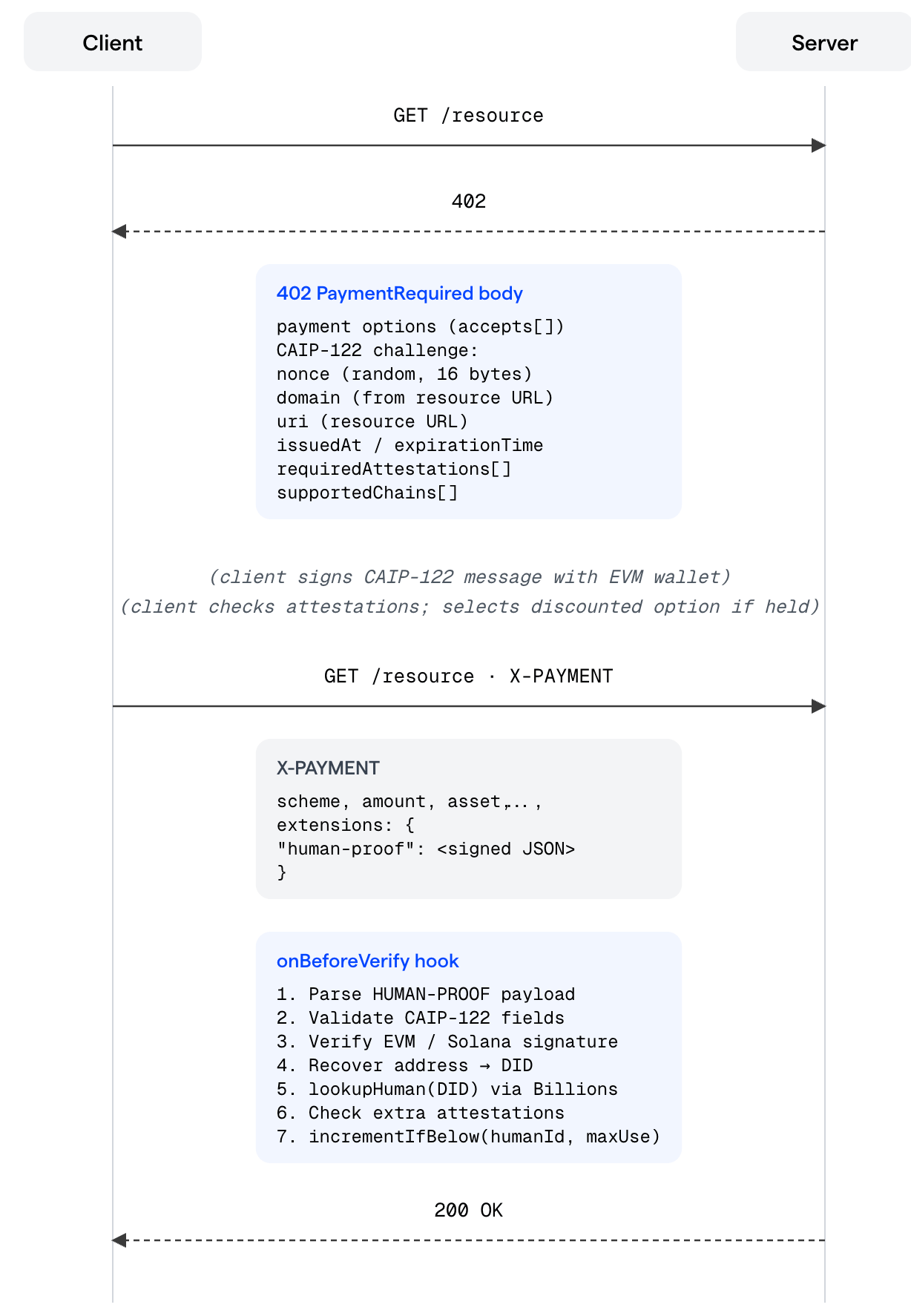
Key insight: Human-proof verification is layered on top of — not in place of — normal x402 payment verification. The facilitator still verifies the on-chain payment. The human-proof hook runs before that, as an additional gate on the selected payment option.
accepts entry has no requiredAttestations in its extra field, the human-proof hook is a no-op and the payment proceeds normally.
Installation
If your server doesn’t use x402 yet, install the x402 packages first:Requires Node.js
>= 20.11.0Setup
Human-proof sits on top of x402 — it adds identity verification to an API that already accepts x402 payments. If you’re new to x402, work through Step 1 first. If your server already accepts x402 payments, jump straight to Step 2.Step 1 — Make your server x402-compatible
x402 is an open payment protocol built on the402 Payment Required HTTP status code. When a client hits a protected route without payment, the server returns a 402 with the accepted payment terms. The client pays and retries; the server settles on-chain and returns 200.
Setting up x402 takes three things: a facilitator (handles on-chain settlement), a resource server (coordinates x402 logic), and a payment middleware (gates your routes).
For the full x402 documentation, see docs.x402.org.
Step 2 — Add human-proof verification
With x402 in place, adding human-proof is a single function call plus two additions to your route config:configureHumanProofServer— registers the challenge generator and verification hook on the x402 server object.- A discounted
acceptsentry — the second pricing tier, gated behind a PoU attestation. declareHumanProofExtension— tells the challenge generator what to embed in each402response for this route.
$0.01; verified human-backed agents pay $0.006.
paywallInstructions() provides the default HTML page shown to browser users hitting a paid URL — it points them to the skill installation.To add per-human usage caps or a custom paywall page, see Usage Limits (maxUse) and Paywall HTML further down.
Complete Example
Here is the full server in one file, combining both steps:Testing Your Integration
The easiest way to test the integration end-to-end is through the Verified Agent Identity skill. Install it onto your agent and the agent becomes capable of the human-proof flow. Chat with the agent to complete the verification and pairing, then ask it to access your local server (http://localhost:4021/weather) — a successful response confirms the agent is recognized as backed by a verified human and the flow works as intended.
Core Concepts
x402 Payment Protocol
x402 is an open HTTP payment protocol built on the402 Payment Required status code. @billionsnetwork/x402-human-proof-server extends the standard x402 flow by embedding a CAIP-122 challenge in the 402 response and verifying a signed proof of identity in the X-PAYMENT extensions before settlement.
Proof of Uniqueness (PoU)
Billions Network issues Proof-of-Uniqueness attestations that cryptographically bind an agent to a verified human. The attestation is an on-chain record with a schema ID and a nullifier — a privacy-preserving identifier that uniquely represents the human without revealing their identity. A PoU attestation binds an agent to a verified human. A single human can authorize multiple agents — all of them resolve to the samehumanId, so quota (maxUse) and verification apply per human, not per agent.
The server SDK uses the attestation schema to verify that a wallet is backed by a registered human, and uses the nullifier as humanId for per-human usage counting.
CAIP-122 Signed Messages
CAIP-122 defines chain-agnostic message signing (“Sign-In With X”). The SDK supports EVM /eip191 (Sign-In with Ethereum). The signed payload includes:
domain, uri, version, nonce, issuedAt, expirationTime (optional), resources, chainId, type, address, signature, and requiredAttestations.
Decentralized Identifiers (DID)
A DID is derived from the agent’s EVM address using the Billions method:Configuration Reference
Environment Variables
configureHumanProofServer(server, options?)
The recommended one-call setup. Registers the extension, wires all lifecycle hooks, and optionally adds rollback hooks when storage is provided.
server.registerExtension(createHumanProofExtension(extensionOptions))— adds the CAIP-122 challenge generator to402responses.server.onBeforeVerify(createVerifyHumanProofHook({...}))— verifies the signed proof before payment settlement.
storage is provided:
onAfterVerify— rolls back usage on facilitator failure.onVerifyFailure— rolls back on hook error.onSettleFailure— rolls back if on-chain settlement fails.
declareHumanProofExtension(options?)
Attaches human-proof rules to a specific route’s extensions block. This is a declaration only — it tells the challenge generator what to include in the CAIP-122 message for that route.
Tiered Pricing
Human-proof is configured per route — each endpoint in yourpaymentMiddleware config can have its own pricing model independently. configureHumanProofServer registers the hook globally, but the hook only activates on routes where requiredAttestations is present.
Configuration Patterns
Pattern 1 — Attestation optional (discount for verified humans)
Pattern 1 — Attestation optional (discount for verified humans)
Any client can access the route. Verified humans pay less; everyone else pays full price. This is the most common setup.
Pattern 2 — Attestation required (verified humans only)
Pattern 2 — Attestation required (verified humans only)
Only PoU-verified clients can access the route. Clients without the attestation are rejected with
402.Pattern 3 — No human-proof (plain x402)
Pattern 3 — No human-proof (plain x402)
Human-proof is bypassed entirely for this route. The hook never runs regardless of
configureHumanProofServer being called.extra Fields on accepts Entries
The accepts array on a route can contain multiple payment options. The human-proof system layers on top to gate access to specific tiers.
accepts entry. The server enforces it:
- If the client chose Tier 1 (no
requiredAttestationsinextra), the hook is skipped entirely. - If the client chose Tier 2 (has
requiredAttestations), the hook verifies the proof and checks attestations. If verification fails, the payment is rejected with402.
Usage Limits (maxUse)
maxUse lets you offer a discounted price up to N times per agent, then fall back to standard pricing automatically.
Server setup:
storage.incrementIfBelow(humanId, maxUse, scope)returnsnull.- The hook returns
{ abort: true, reason: "max_use_exceeded" }. - The server sends
402witherror: "max_use_exceeded"in the payment-required header. - On the client,
isMaxUseExceededError(err)returnstrueanddisqualify()forces the selector to skip discounted options on the next retry. Both helpers are part of the client SDK — see the Client SDK for details.
scope key. A human’s uses are counted across both routes combined.
maxUse: 2 and scope: "forecast_pool", a human who calls /weather once and /forecast once has consumed both uses — the next request to either route returns max_use_exceeded.
Event System
Register anonEvent callback to observe verification lifecycle events:
Storage: HumanUsageStorage
HumanUsageStorage is required when any route uses extra.maxUse. It tracks how many times each human-backed agent has used a given priced tier.
incrementIfBelow— Increment the counter for(humanId, scope)only if it is strictly belowmaxUse. Return the new count, ornullif the limit is already reached.decrementIfAboveZero— Decrement the counter only if it is above zero. Return the new count, ornullif no decrement was performed. Called by the rollback hooks when a payment fails after the counter was already incremented.
InMemoryHumanUsageStorage (development)
An in-memory implementation is available for local development (
InMemoryHumanUsageStorage from the examples directory), but it must not be used in production — state is lost on restart and is not shared across server instances.Production Storage
For production, implementHumanUsageStorage backed by a persistent, shared store. The key constraint is atomicity on incrementIfBelow.
- Redis — Use a Lua script that performs the
GETand conditionalINCRas a single atomic operation. The key format is typicallyhuman_usage:{humanId}:{scope}. Set a TTL (e.g. 30 days) so counters self-expire. Lua scripts in Redis execute atomically on a single shard, making them the right tool here. - SQL (PostgreSQL / MySQL) — Use an
INSERT ... ON CONFLICT DO UPDATE SET count = count + 1 WHERE count < maxUse RETURNING countpattern. A single statement with aWHEREclause is atomic within a transaction and prevents the race condition without needing an explicit lock. Create a table with(human_id, scope)as the primary key and acountcolumn. - Distributed systems — If you run multiple server instances behind a load balancer, the storage backend must be shared (not per-process). A single Redis instance or a common database satisfies this; a per-process in-memory map does not.
Rollback Hooks
When usingconfigureHumanProofServer with a storage, three rollback hooks are automatically registered to keep usage counts consistent with successfully settled payments:
This ensures an agent’s usage quota — tied to a verified human — is only consumed by successfully completed payments. A failed transaction does not burn quota.
To register rollback hooks manually (when not using
configureHumanProofServer):
Paywall HTML
When an unpaid request arrives, the server can return a custom HTML page.paywallInstructions() provides a default page that directs agents to install the identity skill, which enables agents to understand how to sign human-proof challenges, select the right payment tier, and complete the full x402 flow.
Low-Level Helpers
createHumanProofExtension
Lower-level function that creates the ResourceServerExtension object. configureHumanProofServer calls this internally. Use it directly if you need to register the extension manually with server.registerExtension(...).
What it generates inside each
402 response:
The
nonce is generated fresh with randomBytes(16) on every 402 response, making each challenge unique and replay-proof.createVerifyHumanProofHook
Creates the onBeforeVerify hook function. configureHumanProofServer calls this internally. Use it directly for fine-grained lifecycle control.
requiredAttestations is absent or empty on the selected accepts entry, the hook returns immediately and payment proceeds normally. Otherwise it validates CAIP-122 fields, verifies the EVM signature, resolves the DID against the Billions Network registry, checks any additional attestation schemas, and enforces maxUse if configured.
createPoUVerifier
Creates the default Proof-of-Uniqueness verifier that queries the Billions Network explorer API.
record.fromId via the nullifier API to return { humanId: nullifier, verifiedAt: ISO8601 }.
Troubleshooting
invalid_signature even though the client signed correctly
invalid_signature even though the client signed correctly
The most common cause is a URI mismatch. The CAIP-122 message embeds the resource URI at signing time, and the server validates that it matches the actual request URL. Check that the
uri in the proof exactly matches http(s)://your-host/your-path — trailing slashes, port numbers, and query strings all matter.not_registered for a DID that should be registered
not_registered for a DID that should be registered
The server calls
lookupHuman, which requires both an attestation record and a valid nullifier via the nullifier API. An attestation existing on the explorer is not enough — fromId must be present on the attestation record and the nullifier API must return a result for it. Verify both by checking the Billions Network explorer directly for your DID.message_expired immediately after signing
message_expired immediately after signing
This usually means significant clock skew between the client and server. The
expirationTime is computed from the server’s clock at 402 generation time. If the client’s clock is far behind the server’s, the message may expire before the client retries. Check NTP sync on both sides.misconfigured_max_use_storage error
misconfigured_max_use_storage error
A route has
extra.maxUse set but no storage was passed to the hook. Pass a storage implementation to configureHumanProofServer or createVerifyHumanProofHook.max_use_exceeded on the first request
max_use_exceeded on the first request
The counter is per
(humanId, scope). If the same human-backed agent previously used the discounted tier (even in a previous server session, if using persistent storage), their counter is already at the limit. Either increase maxUse, change the scope key, or flush the counter in your storage backend.Human-proof check fires even though I didn't set requiredAttestations
Human-proof check fires even though I didn't set requiredAttestations
The hook only runs when
context.requirements?.extra?.requiredAttestations is non-empty. If the hook is running unexpectedly, the client is selecting an accepts entry that has requiredAttestations in its extra. Check which payment option the client is choosing.Error Reference
These values appear in thereason field when the hook aborts, and in the error field of the x402 payment-required header returned to the client.